AV Central
The console. The wireless rack. The stream. The lighting rig. The switch closet. The plan.
Sunday lives in six places at once — AV Central puts it on one screen.
Drag the line. That is the whole pitch.
Mic 3 battery 34% · seen 09:12
coordination: 3 conflicts
bitrate 3.1 Mbps · frames dropped
concurrents: refresh to update
"ask Dave which pack is bad"
plan changed Wed 16:12 — did FOH see it?
Left: six apps, one browser, tribal knowledge. Right: the Audio — FOH dashboard, live.
ETC Ion · DMX universe 2 · house right
Sunday, under control.
Role-based live dashboards for the whole team — plan, SPL, wireless, streams, stage display, reports, trends. The heartbeat of the platform.
- Live plan with ProPresenter auto-advance into Planning Center
- Per-minute wireless battery and RF history with dying-pack flags
- Reports that record themselves, and a Monday digest that sends itself
The paperwork, drawn for you.
Plots, patch sheets and signal-flow drawings that stay honest — imported from the tools you already use, exported as clean packages.
- Imports Vectorworks, DXF, MVR and GDTF files
- Patch checks that flag conflicts and rig-load problems before load-in
- Print-ready PDF packages, console exports, port maps and gel lists
Volunteers, ready before Sunday.
Practice on real services, not descriptions of them — and keep every position's weekly routine written down where it gets done.
- Training replay — any archived service re-runs at 1× to 8× speed
- Real plan, SPL, viewers and incidents, exactly as they happened
- Per-position checklists that reset themselves every Monday
Know before the building does.
Every device, UPS and switch watched around the clock, with a diagnosis — not just a red dot — when something drops.
- TCP and ping probes on everything, grouped by room
- Automatic offline diagnosis: device, switch, subnet or cabling
- SNMP power and network telemetry, webhooks to Slack, Discord or Teams
This is the real app, recorded live.
Not mockups — screen recordings of v1.1.0-beta.49 running its built-in demo service, at 5× speed. The plan advances, batteries drain, countdowns tick.
Fifteen widgets, one glance.
Stream stats climbing, ProPresenter slides changing, alerts scrolling — the Video/Streaming position, live. Every widget here drags and resizes per position; edit mode is PIN-gated so Sunday stays put.
The stage sees everything it needs.
Clock, service remaining, current and next item — full screen on any TV, and its panels rearrange in edit mode just like the dashboard. Watch the plan advance as ProPresenter fires.
Every pack, every battery, every minute.
Who is on which transmitter, with live battery and RF — and a WATCH flag the moment one drains too fast.
The band gets their own screen.
Faces, packs, batteries, signal — one glance backstage, no tech knowledge required.
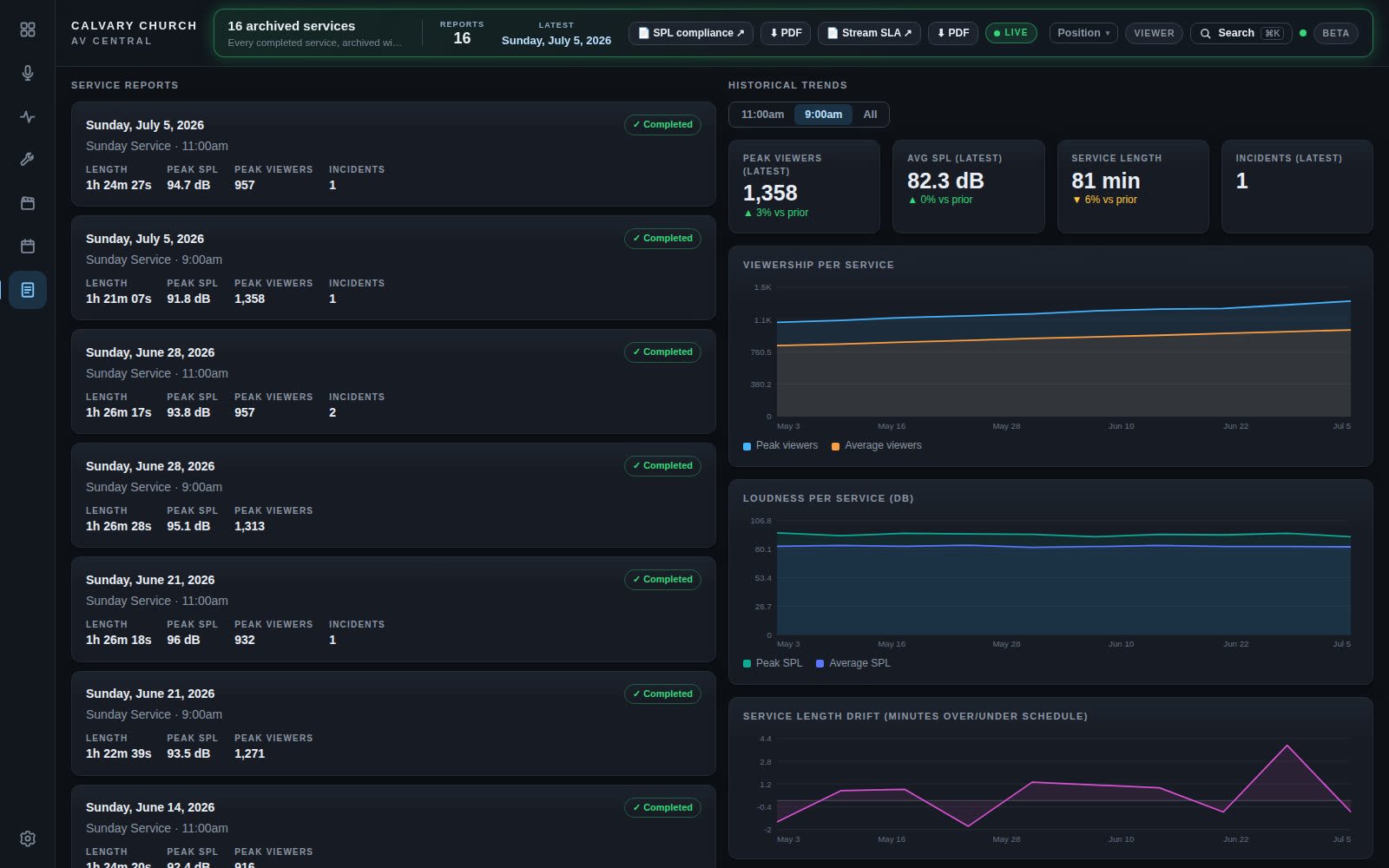
Week-over-week viewership, loudness, drift — plus print-ready SPL compliance and streaming SLA reports.
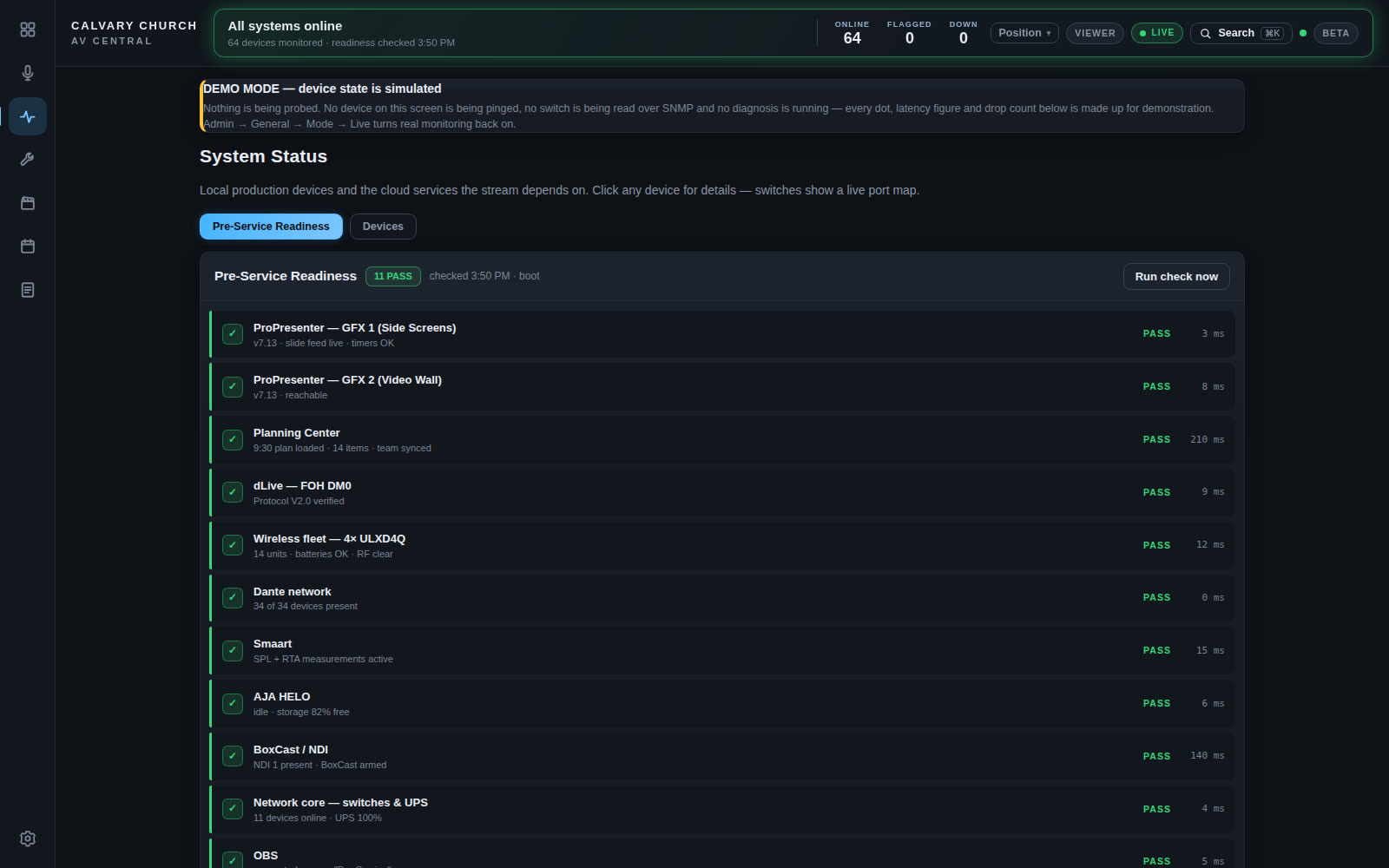
Eleven checks before every service — pass or fail, in one glance.
Captured from demo mode — no real gear attached
Press the buttons. Nothing can break.
A little slice of the live dashboard, simulated right here — the same actions a Stream Deck key fires in the real booth.
Type a room number and press ✓ — it flashes on the stage display until cleared. The real /paging page can do exactly this and nothing else.
One sheet calls the whole show.
Cues pull from ProPresenter and Planning Center, every position gets a ready check, and the caller runs it from any screen — print and PDF included. Call this one yourself: GO advances, HOLD freezes the clock, pin chips onto cues, arm a custom call.
Keep scrolling.
Build the rack.
Every unit that slides in here is gear AV Central already speaks to — no agents installed on anything, just the vendors' own documented protocols.
Ask the room anything.
A chat that is briefed on the live state of the building — batteries, plan, devices, history. Works from live data out of the box; add an Anthropic key and it turns fully conversational. These five are scripted from the demo service.
Next: the whole building on one calibrated plan.
The unified plan — every fixture, rack, wall and cable run drag-to-place on the floor plan, with an inspector that shows exactly what gets stored. The drawings module ships the data model today; this is the next chapter, in design now.
id: "beam-sr",
plan: {
x: 18.4,
y: 6.1,
rot: 45
}
}
Mocked in the AV Central design lab — not in the shipping beta yet, and the site says so honestly. Flip the incident switch to see the emergency takeover.
It already speaks to the gear you own.
Twenty-five-plus connectors written against the vendors' own documented protocols. No agents, no middleware. Demo mode simulates all of it before you connect a single cable.
Ready to run it in your booth?
Builds, setup docs, release notes and feedback all live on the download page — one command and the demo service is running.
⚠ Public beta — not every feature is fully stable yet